If you cannot remember your password or if the password you use is not being accepted, you can complete a password reset. This is for confirmed users only and will not work if you have not yet set a password.
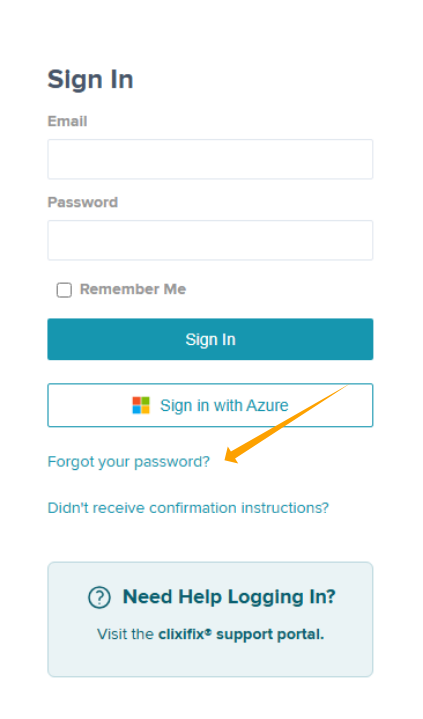
Step 1: Click Forgot your password? on the clixifix® Login Page as shown in the screenshot below or use this link Password Reset
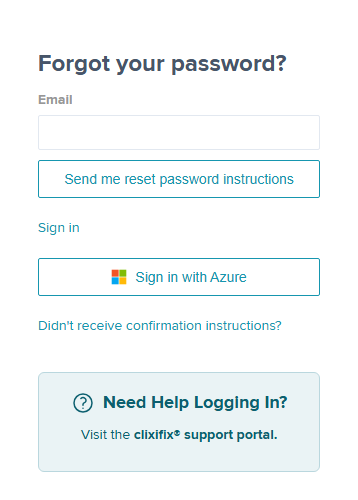
Step 2: Enter your email address & click Send me reset password instructions
Step 3: An email will follow, please check your junk folder if this does not arrive into your inbox.
Click the link Change my password from the email.
Passwords must be;
- Minimum of 8 characters
- Minimum of one upper case letter
- Minimum of one lower case letter
- Minimum of one numeric character
- Minimum of one special character

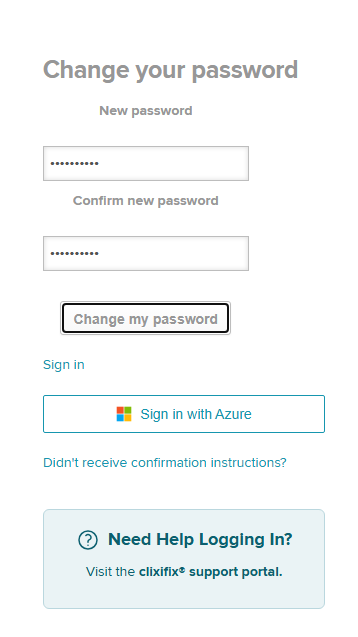
Step 4: Enter your new password in both boxes and click Change my password
You will be redirected back to the login page. Please login using your new details.
If you're having difficulty logging in using your new credentials, please ensure you're entering details manually & not using any kind of autofill/keychain/saved password.
Was this article helpful?
That’s Great!
Thank you for your feedback
Sorry! We couldn't be helpful
Thank you for your feedback
Feedback sent
We appreciate your effort and will try to fix the article